CRM for Insurance Agents: 5 Best Options Compared (2026)
A CRM for insurance agents should make lead follow-up, producer activity and pipeline visible without pretending to replace the AMS. The right choice depends on how your agency sells.
Our picks at a glance
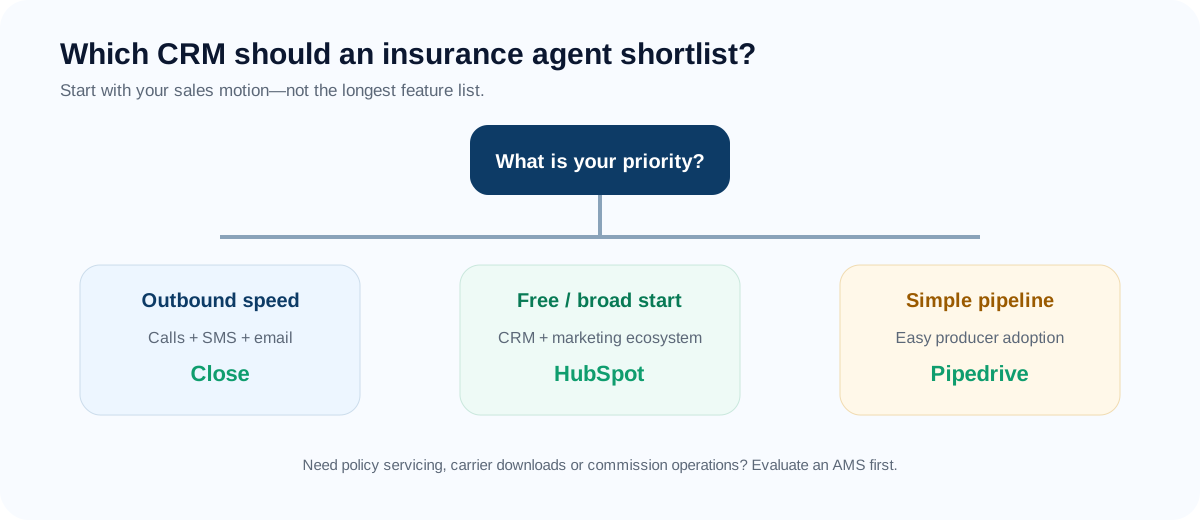
Choose by your role, then by how you sell
A solo agent, an account-focused broker and an agency owner may need different views of the same sales process. Use your role to identify the work, then use sales motion to build a two-tool shortlist.
Make the next follow-up obvious
Start with a contact record, a simple lead-to-bind pipeline and one dated next action for every active opportunity. HubSpot or Zoho is worth evaluating if a free start matters; a phone-heavy sales process may justify comparing Close instead.
Trial test: Log a new referral, schedule the next call and find every overdue follow-up without help.
Keep relationships and opportunities connected
For accounts with several decision-makers, test how contacts, referral partners, coverage interests and renewal-review tasks connect. Compare Pipedrive, HubSpot or Zoho against that workflow; do not assume a generic CRM already has the insurance data model you need.
Trial test: Add one business account, two contacts and two coverage opportunities. Can you see the owner and next action for each?
See which work needs attention
Prioritize lead assignment, producer ownership, activity visibility and reports that answer a management question. Choose for the team's actual selling process and test the reporting tier before buying. Keep bound-policy and premium records in the AMS.
Trial test: Find unassigned leads, opportunities with no next task and results by source and producer.
These are evaluation shortlists, not a claim that one product is best for every agent with the same job title. Referral-led solo agents and high-volume phone producers can need very different tools.
Three agency scenarios
Purchased-lead personal lines team
A five-producer team receiving a steady volume of internet leads should prioritize assignment speed, visible last-contact time, calling and texting workflow, retry discipline and source-level conversion. Close or Salesmate belongs on the shortlist before a highly configurable but slower-to-adopt platform.
Established independent P&C agency
An agency with an AMS and a mature service team should keep carrier download, policy servicing and certificates in the AMS. The CRM should focus on producer pipeline, referral sources, renewal-review conversations and cross-sell opportunities.
Commercial-lines producer
A commercial producer needs account-level visibility across multiple contacts, long sales cycles, renewal dates, exposure-discovery tasks and a reliable next action. Pipeline clarity and flexible account structure matter more than mass-sequence volume.
Scenario note: These are representative decision scenarios, not claims about a specific agency or measured customer result.
Map the U.S. agency workflow before booking demos
A producer CRM should make the next revenue action obvious without becoming a shadow AMS. Before comparing products, write down which system owns the prospect, account, policy, activity and consent records.
| Agency question | Why it changes the CRM choice |
|---|---|
| Are leads inbound, purchased, referred or producer-sourced? | Assignment speed, source attribution and follow-up cadence differ. |
| Is the sale personal lines, life/health or commercial? | The unit of work may be a person, household, employer or multi-contact account. |
| Where do carrier download and policy servicing live? | A sales CRM should not become an uncontrolled duplicate policy database. |
| Do producers call or text from the platform? | Consent, suppression, recording and state-specific review become part of implementation. |
| Can the agency export its data and activity history? | Exit risk matters when the CRM becomes the record of sales activity. |
Quick comparison
Plans, prices and free-tier limits change often. Treat this table as a starting point and confirm on each vendor’s site.
| Tool | Best fit | Sales strength | Insurance caveat | Free option? |
|---|---|---|---|---|
| Close | Outbound-heavy agencies | Calling, SMS, email, sequences | Not a policy system | Free trial (no permanent free plan) |
| HubSpot | Free start / broad ecosystem | CRM + marketing + service | Advanced tiers get expensive | Free tier with limits |
| Pipedrive | Pipeline simplicity | Fast adoption, visible stages | Needs integrations for deeper insurance use | Free trial (no permanent free plan) |
| Zoho CRM | Budget + customization | Fields, automation, broad suite | More setup decisions | Free edition for very small teams |
| Salesmate | Small sales teams | Calling, sequences, quotes | Horizontal CRM, not AMS | Free trial (confirm current terms) |
Our evaluation framework
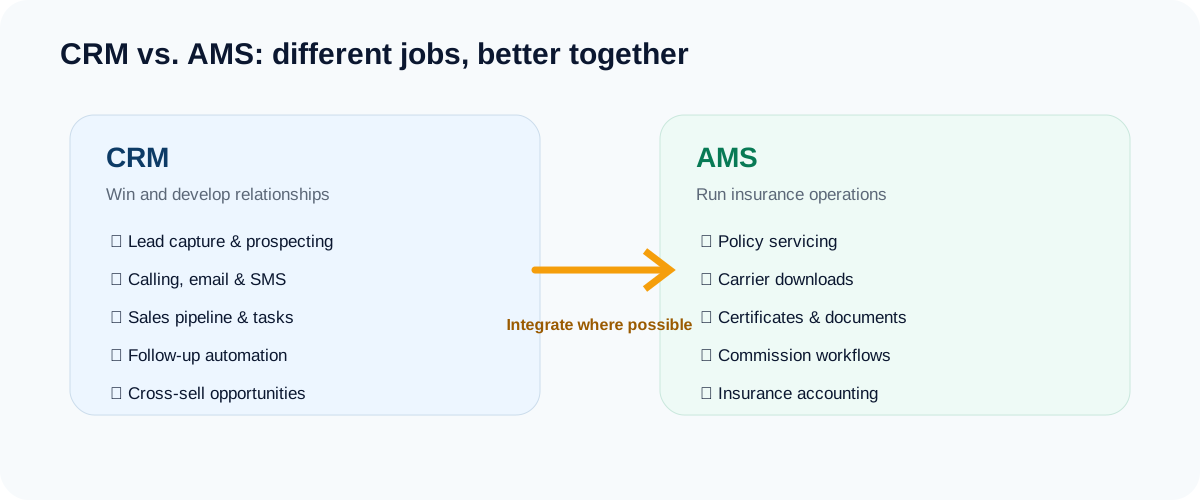
Insurance sales has two very different software jobs. The first is winning and developing relationships: capture leads, contact them quickly, manage next actions, quote, follow up and cross-sell. The second is running insurance operations: policies, carrier data, certificates, commissions, servicing and accounting. A CRM can excel at the first while being the wrong tool for the second.
1. Close — best for outbound-heavy teams
Close is a strong fit when producers live in the phone, email and SMS queue. Its product is designed around sales activity, which reduces the need to stitch a separate dialer onto a basic contact database. That matters for agencies buying leads or running consistent outbound sequences.
Close
- Speed-to-lead and call volume matter
- You want sales communication inside the CRM
- Your AMS already handles policy operations
- You need carrier downloads or servicing workflows
- Your main motion is inbound marketing
- You want a full customer-platform ecosystem
Best when your producers live in calls, texts and email. Ask for an all-in monthly cost that includes calling and SMS usage before you commit.
See Close for insurance →2. HubSpot — best free/broad starting point
HubSpot gives a small agency a credible way to move off spreadsheets with a free CRM and then expand into marketing, service and automation as needs grow. The risk is cost creep: the attraction is the ecosystem, but advanced automation and larger packages can quickly become a materially bigger software decision.
- You want to leave spreadsheets with no upfront cost
- You may add marketing or service tools later
- You value a large integration ecosystem
- Your budget cannot absorb paid-tier upgrades as automation needs grow
- You want calling and texting deeply built in from day one
- You want an insurance-specific setup out of the box
3. Pipedrive — best for pipeline simplicity
Pipedrive works well when producer adoption is the biggest obstacle. Its value proposition is not insurance-specific depth; it is making the sales process obvious enough that a team actually uses the CRM every day.
- Producer adoption is your biggest risk
- You already have an AMS and need a clean sales layer
- You want a visual, drag-and-drop pipeline
- You need marketing automation in the same tool
- You want deep built-in calling and texting without integrations
- You expect insurance-native fields and reports out of the box
Use the trial to see whether producers actually keep the pipeline current before you commit.
Try Pipedrive →4. Zoho CRM — best for flexible lower-cost setups
Zoho rewards teams willing to define custom fields, workflows and dashboards. It can be attractive for an agency that wants more flexibility than a bare-bones CRM without jumping straight to enterprise pricing.
- You want custom fields, workflows and dashboards on a budget
- You already use other Zoho apps
- Someone on your team enjoys configuring software
- You want to be productive on day one with no setup
- Nobody will own configuration and maintenance
- You plan to outgrow a small-team free edition quickly
If configurable fields and workflows fit your needs, review the available editions and test one small sales workflow.
Visit Zoho CRM →5. Salesmate — best value for a small sales team that wants more built in
Salesmate’s current Basic plan starts at $23 per user per month and includes contact/company management, deal pipelines, email sync, templates, tracking, meeting scheduling, web forms and custom fields. Its Pro plan adds sequences and product/quote management. Calling and texting are listed separately as add-ons; confirm the billing cycle and usage charges with the vendor. That makes it a useful comparison point for small agencies that want more sales functionality before moving to a larger platform.
- A small team wants calling, sequences and quotes in one CRM
- You want more built in than a basic pipeline tool without a larger platform
- You want a lower-commitment comparison point against Close and Pipedrive
- You need insurance operations (it is not an AMS)
- You rely on a large community of consultants and templates
- You need sequences but only budget for the entry plan
Six numbers an agency owner should be able to explain
Ask the vendor to build these from a small test dataset. A chart is useful only if everyone agrees on the definition and the source of the underlying records.
| Measure | Define it before comparing | Record or dependency |
|---|---|---|
| Leads by source | Count unique new leads in the same period; agree how referrals and duplicate imports are classified. | Lead creation date and a required source field. |
| Time to first contact | Track elapsed time to first outreach; report successful contact separately. Decide whether the clock uses business hours. | Lead timestamp plus call, email or task activity. |
| Quote-to-bind rate | Bound opportunities divided by quoted opportunities from a defined cohort; specify how revised quotes are counted. | Quote stage history and a confirmed bind event from the AMS or carrier workflow. |
| Pipeline by producer | Open opportunities by owner and stage. Label expected premium and expected revenue separately. | Consistent owners, stages and value definitions. |
| Renewal-review completion | Completed review tasks divided by reviews due in the period. This is not the same as policy retention. | AMS renewal dates and CRM review tasks, with a named sync owner. |
| Cross-sell conversion | Closed cross-sell opportunities divided by a defined set of eligible opportunities. | Coverage-gap criteria and confirmed bound outcomes; often requires AMS data. |
Availability depends on plan, configuration and integration. A generic CRM should not be presented as producing insurance-specific metrics automatically.
Nine questions to ask on every CRM demo
Demos are built to impress. These questions are built to reveal what the demo skips. Ask them of every vendor and compare the answers side by side.
- Show me a new lead arriving. How many clicks until a producer can call it, and who gets it?
- What happens to a lead with no next task? Can I see every lead that has none?
- What is my all-in monthly cost? Price our seat count with the add-ons we need, including calling, texting and email usage.
- Which plan includes what I saw? Confirm sequences, automation, reporting and integrations plan by plan.
- How do consent, opt-outs and suppression work for calls and texts? What stays our responsibility?
- Can we export everything? Contacts, notes and activity history in bulk, and in what format.
- How does it work beside our AMS? Which fields sync, which do not, and what does the API allow?
- What does onboarding look like for a producer who dislikes software?
- What changed in the last year? Plans, pricing and features have been reshuffled at many vendors, so ask what is stable.
Five mistakes agencies make when buying a CRM
- Buying for features, not for the next action. If a producer cannot see what to do today, features do not matter.
- Skipping the AMS boundary. Decide which system owns each field before you import anything.
- Underpricing usage. Calling, texting and add-ons can change the real monthly cost.
- Importing everything. Bringing every legacy column recreates the old mess in a new tool.
- No exit plan. Test the export before your data lives there.
Fixing these is mostly process work. Our 30-day rollout plan and pipeline stage rules cover the groundwork.
How to choose in 10 minutes
Use the first 10 minutes to narrow the shortlist
- Name the problem: missed follow-ups, slow lead response, unclear producer ownership or policy servicing.
- Write a minimal pipeline: new lead, contacted, qualified, quoted, bound or lost. Keep renewal reviews as a separate workflow.
- List only the fields you need: owner, source, coverage interest, next action and the account or household relationship. Identify which dates and outcomes must come from your AMS.
- Choose two tools: use the shortlist above or the 60-second finder. Check the plan and all-in cost before starting a trial.
Set up the minimum fields → · Follow the 30-day rollout plan →
What if your main problem is funnels and lead nurture?
HighLevel combines CRM capabilities with a broader marketing platform. It may belong on your shortlist when campaign landing pages, appointment booking and nurture are the main job. We discuss it separately here to keep the five sales CRM options comparable, not because HighLevel lacks CRM features. Read the HighLevel guide →
FAQ
What is the best CRM for insurance agents?
The right answer depends on sales motion. Close is strongest for outbound-heavy teams in this shortlist; HubSpot is the easiest free/broad entry point; Pipedrive emphasizes pipeline simplicity; Zoho emphasizes flexibility; Salesmate sits between simple pipeline CRM and all-in-one sales tool.
Can CRM replace an AMS?
Usually not if the agency depends on policy servicing, carrier downloads, insurance accounting, certificates or commission workflows. Many agencies benefit from a CRM + AMS architecture instead.
How much does an insurance CRM really cost?
Seat price is only part of it. Add usage charges for calling and texting, plan upgrades for automation, integrations and the time it takes to set up. Ask each vendor for an all-in monthly estimate for your team size.
Can I switch CRMs later?
Yes, but it is real work. Keep your data clean, avoid unnecessary custom fields and test the bulk export before you commit.
Should an independent agent start free?
Yes if the immediate goal is better follow-up discipline. The most important thing is clean data, a simple pipeline and a clear path to export or migrate later.
Keep reading
Primary sources & verification
Product facts below are based on current vendor documentation. Pricing, plans and free-tier limits can change.