Pipedrive for Insurance Agents: Fit, Trade-offs & Setup (2026)
Pipedrive can be a strong sales layer for the right agency—but only if you keep its job clear.
Where Pipedrive fits
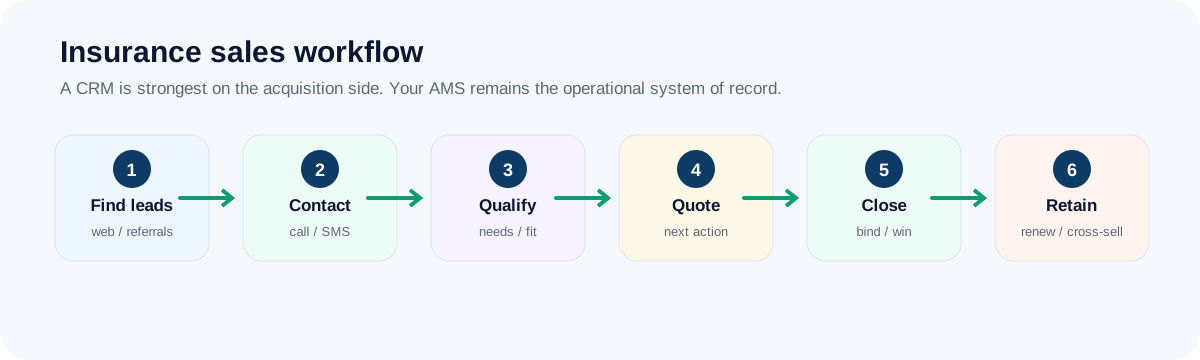
A visual sales pipeline that works especially well beside a separate AMS. For an insurance agency, the best implementation is usually narrow at first: leads, activities, next actions and closed-won visibility. Keep policy servicing and carrier-centric work in the system built for it.
Where Pipedrive shines for insurance agencies
- A visual, drag-and-drop pipeline producers understand in minutes
- Activity reminders that make “what is due today” obvious
- A clean sales layer beside an AMS that already owns policy servicing
- Fast setup: less configuration before you get value
- A marketplace of integrations for calling, forms and email tools
A day with Pipedrive (representative scenario)
A producer opens the pipeline board, drags a quote from “Discovery / quote” to “Proposal follow-up” and schedules a call for Thursday. Overdue activities rise to the top of the day’s list. On Monday the agency owner reviews the same board: stalled deals, deals with no next activity and where leads are dropping out.
Representative scenario for illustration, not a customer result.
Where Pipedrive is a weak fit
Pipedrive keeps things simple on purpose. That is the reason to choose it and also its limit. Insurance-specific structure (households, policies, renewals) needs custom fields or integrations, marketing tools such as campaigns and lead capture may be separate add-ons, and heavy built-in calling workflows may depend on integrations.
- Teams that want marketing automation in the same tool
- Call-and-text-heavy lead teams that want everything native
- Agencies expecting insurance-native fields and reports out of the box
Insurance-sales scorecard
Editorial fit scores out of 10, based on the workflow criteria in our review methodology.
What to check before you pay
- As far as we know there is no permanent free plan, only a free trial. Confirm current terms.
- Which plan includes the automations, email sync and custom fields you would rely on.
- Which add-ons or integrations you would need for calling, forms and campaigns, and what they cost.
- How reporting handles source-level conversion, before you assume it is enough.
Use the free trial to build your stages and have a producer run a full day from the board before committing to a paid plan.
See Pipedrive plans & trial →A one-week pilot plan for Pipedrive
- Build pipeline stages to match how your producers really sell (start from our six-stage framework).
- Require a next activity on every open deal.
- Connect email and calendar, and test calling through the integration you intend to use.
- Add a handful of custom fields: source, product line and estimated premium.
- Have each producer run a full day from the board and note every point of friction.
Frequently asked questions
Is Pipedrive good for insurance agents?
It is a general sales CRM, not an insurance-native one. It shines at pipeline clarity and quick adoption, and works best as the sales layer beside an AMS that handles policies and servicing.
Does Pipedrive have a free plan?
As far as we know it offers a free trial rather than a permanent free plan. Confirm current plans on Pipedrive’s pricing page.
Verdict
Pipedrive belongs on the shortlist when simple pipeline discipline is the problem you are solving. It should not be ranked as “best insurance CRM” without that context.
If what you need is a cleaner sales pipeline, clearer next actions and better producer adoption, test Pipedrive with your real workflow before you buy.
Try Pipedrive with your pipeline →Keep reading
Primary sources & verification
Product facts below are based on current vendor documentation. Pricing, plans and free-tier limits can change.