HubSpot for Insurance Agents: Fit, Trade-offs & Setup (2026)
HubSpot can be a strong sales layer for the right agency—but only if you keep its job clear.
Where HubSpot fits
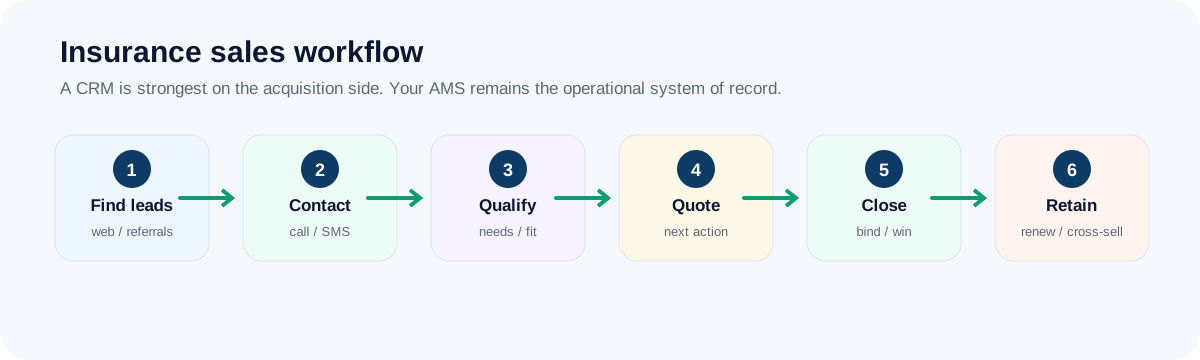
A free foundational CRM plus marketing, sales and service expansion paths. For an insurance agency, the best implementation is usually narrow at first: leads, activities, next actions and closed-won visibility. Keep policy servicing and carrier-centric work in the system built for it.
Where HubSpot shines for insurance agencies
- A free starting point for agencies moving off spreadsheets and inboxes
- Contact, company and deal records with email tracking and meeting scheduling
- A large integration ecosystem, plus plenty of tutorials, templates and consultants
- Room to add marketing and service tools later without switching platforms
- A widely used interface, so many new hires already know their way around
A day with HubSpot (representative scenario)
A producer logs a referral as a new deal, sets a follow-up task and schedules a call from a calendar link. Once a week the agency owner opens a dashboard showing new leads, deals by stage and win rate by lead source. A few months in, the agency adds an email sequence for quote follow-up, which is also the moment they decide whether a paid tier is worth it.
Representative scenario for illustration, not a customer result.
Where HubSpot is a weak fit
HubSpot is a broad platform, which is both its strength and its risk. If policy servicing, carrier downloads, certificates or commissions are the pain, it will not fix them. And if you expect to lean on automation, sequences and reporting across the whole team, plan for paid tiers: the step up from free can be significant.
- Teams that want calling and texting deeply built in may find a purpose-built tool like Close simpler
- Agencies that want an insurance-specific setup out of the box
- Owners who do not want to think about tiers, hubs and add-ons
Insurance-sales scorecard
Editorial fit scores out of 10, based on the workflow criteria in our review methodology.
What to check before you pay
- Free-tier limits (users, contacts, pipelines, and whether forms and emails carry HubSpot branding). They change.
- Which paid tier includes the automation and sequences you would need, and the per-seat cost at your team size.
- Whether you would need Sales Hub alone or additional hubs. Price the stack you would really use.
- Test the bulk export of contacts, notes and activity history before you commit data.
Start with the free tools, connect your email and calendar, and see whether producers open it every day.
Visit HubSpot →A one-week pilot plan for HubSpot
- Set up one deal pipeline with the six stages from our pipeline framework.
- Add only the properties you will use: source, product line and next step.
- Connect email and calendar before you build any automation.
- Build one dashboard: new leads, deals by stage and deals by source.
- Decide in advance what would justify a paid upgrade, so upgrading is a decision and not a drift.
Frequently asked questions
Is HubSpot enough to replace an agency management system?
No. HubSpot is a sales and marketing CRM. It was not built to hold carrier downloads, certificates, policy accounting or commission records, and using it that way creates duplicate, unreliable data. Pair it with an AMS rather than asking it to replace one—see our CRM vs AMS breakdown for the field-by-field split.
Which HubSpot tier do insurance agencies actually need?
Most agencies start on the free or entry-paid tier for lead capture, pipeline stages and basic email sequencing, then add Sales Hub automation only once producers are consistently working the pipeline daily. Jumping straight to a higher tier before adoption is proven rarely pays off. Confirm current tier pricing on HubSpot's official pricing page before budgeting.
How does HubSpot compare to Close or Zoho for an insurance sales team?
Close leans more purpose-built for outbound calling and SMS-heavy producers; Zoho is typically cheaper for agencies that want deep customization. See HubSpot vs. Close and HubSpot vs. Zoho for the direct trade-offs.
Does HubSpot handle TCPA and communication consent correctly for insurance outreach?
HubSpot provides opt-out and suppression tooling like most modern CRMs, but the agency—not the vendor—remains responsible for TCPA, CAN-SPAM and state-specific consent rules. Confirm current compliance features directly with HubSpot before relying on them for regulated outreach.
Verdict
HubSpot belongs on the shortlist when free/broad starting point is the problem you are solving. It should not be ranked as “best insurance CRM” without that context.
Keep reading
Primary sources & verification
Product facts below are based on current vendor documentation. Pricing, plans and free-tier limits can change.